Immediate Mode with Opaque Blending Mode appears not to respect depth

Per the documentation:
- "Opaque writes to the depth buffer, and sorts properly even when intersecting other shapes."
- "Opaque shapes both write and read from the depth buffer, which means they are automatically rendered with correct depth no matter the order"
However I'm unable to produce this behavior using immediate mode shapes.
Below is a side-by-side comparison of the same test object, with RGB discs aligned to the 3 planes and a unit cube in the center. As you can see, despite the immediate-mode blending mode being set to Opaque it appears to be rendered the same as the component-based discs when their blending mode is set to Transparent.
Component-based discs set to Opaque appear to be correctly respecting depth (as expected), but the immediate-mode shapes set to Opaque are not.
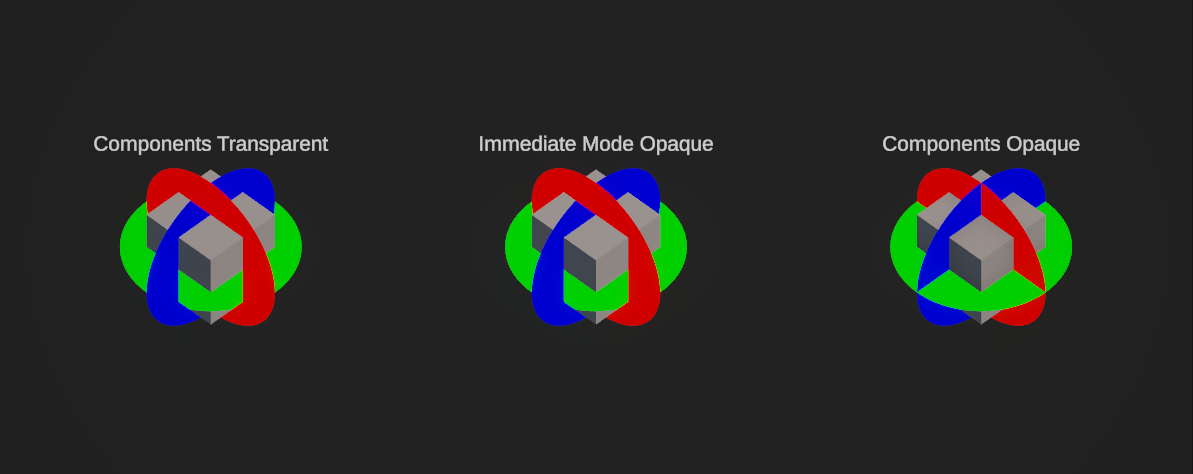
And the editor view (in case that's helpful)
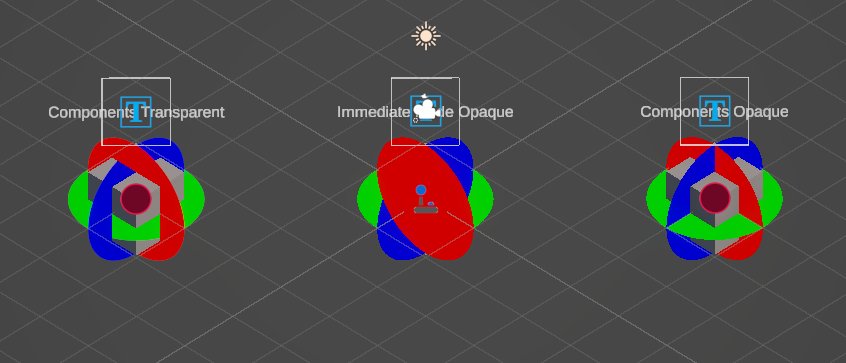
The code generating each immediate mode disc used to produce this comparison is as follows:
using UnityEngine;
using Shapes;

[ExecuteAlways]
public class ImmediateModeDisc : ImmediateModeShapeDrawer
{
    public Color color;

    public override void DrawShapes(Camera cam)
    {
        using (Draw.Command(cam))
        {
            Draw.SizeSpace = ThicknessSpace.Meters;
            Draw.Matrix = transform.localToWorldMatrix;
            Draw.BlendMode = ShapesBlendMode.Opaque;

            Draw.Disc(Vector3.zero, Vector3.up, 1f, color);
        }
    }
}
Reporting a bug? please specify Unity version:
6000.3.9f1
Reporting a bug? please specify Shapes version:
4.5.1
Reporting a bug? please specify Render Pipeline:
URP