Opaque Shapes component not drawn to depth texture in BIRP

I know BIRP will be phased out maybe in 2-3 years so not really a big deal, but currently Opaque Shapes component doesn't seem to be rendered in depth texture. As shown in this quick footage:
- Placing a default cube alongside a Opaque rectangle shows the rectangle unaffected by depth of field
- Looking into Frame Debugger shows the Opaque rectangle not queued into the depth prepass
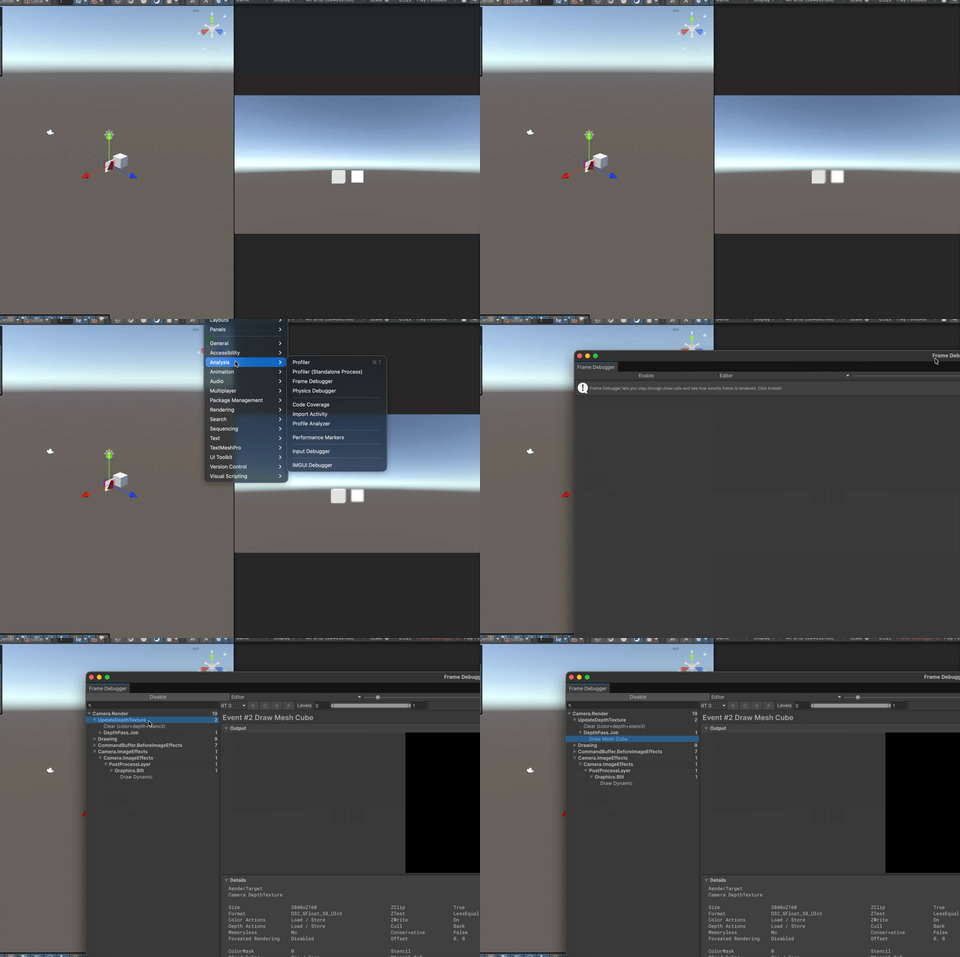
Not sure if this is a Unity issue because I don't know about how BIRP works but I know URP is now designed around a depth prepass then needing to manually copy depth later if needed. Maybe some under the hood changes broke BIRP along the way.
Reporting a bug? please specify Unity version:
6000.3.14
Reporting a bug? please specify Shapes version:
4.6.0
Reporting a bug? please specify Render Pipeline:
Built-in render pipeline

The GIF I provided was reproduced using the following steps:
- Create a completely new project from "3D (Built-in Render Pipeline)" template from Unity Hub.
- Download Shapes (4.6.0) directly through package manager.
- Download Post Processing package.
- Create both a 3D Object Cube and a Shapes Rectangle in the default scene.
- Add Post Processing Layer onto the default Main Camera.
- Add Post Processing Volume in the default scene then set to Global while adding Depth of Field effect onto it.